


 Hatch Embroidery Digitizer
 Hatch Embroidery Composer
 Hatch Embroidery Personalizer
 Hatch Embroidery Organizer






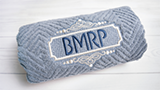



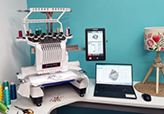








CorelDRAW® Graphics Suite empowers you with professional capabilities to edit or create Vector, SVG, Bitmap, and various supported image formats, ensuring seamless integration and enhanced functionality. You can directly link to Hatch Composer and Digitizer levels, providing a plethora of auto and manual digitizing options for optimal convenience and precision.
CorelDRAW GEM is intricately designed to augment your Hatch experience, allowing for interactive graphics creation and editing. Utilize this dynamic duo to edit your images before importing them into Hatch, ensuring the highest quality and best manual or auto-digitizing results, and explore new horizons in crafting beautiful, intricate, and functional graphics with ease and precision.
- *All prices exclude applicable taxes
-
 30-Day Money-Back Guarantee
Professional graphics,
seamlessly connected
to your embroidery.
CorelDRAW® Graphics Suite 2025 links directly to Hatch Embroidery Digitizer 4, giving you a fully integrated design and embroidery workflow - without switching programs.
- Switch between vector design and embroidery in a single click
- Convert vector artwork and SVG files directly into stitches
- Trace bitmap images into clean vectors with PowerTRACE
- Includes Corel PHOTO-PAINT for photo editing and image prep
Embroidery quality starts with artwork quality
The better your artwork going in, the better your embroidery coming out. CorelDRAW gives you professional-grade vector tools to create, clean, and prepare graphics before they become stitches - leading to cleaner paths, smoother satin columns, and fewer production headaches.
Seamless Hatch Integration
Switch between CorelDRAW's Graphics Mode and Hatch's Embroidery Mode at the click of a button. No file exporting, no switching applications - just a connected workflow.
Better Auto-Digitizing Results
Clean vector artwork produces dramatically better automatic embroidery conversions. Use CorelDRAW to prepare and refine your graphics before digitizing for superior stitch quality.
One-Click Conversion
Convert vector graphics directly into embroidery objects with Hatch. Tag shapes as appliqué, match thread colors, and preserve graphic elements - all in the same workflow.
70+ File Formats
Import CDR, AI, SVG, EPS, PDF, JPEG, PNG, BMP and dozens more. Bring in customer logos, artwork, and photos, then prepare them for perfect digitizing results.
Professional Drawing Tools
Freehand, Bezier, shapes, node editing, and the full CorelDRAW vector toolkit. Create logos, monogram layouts, lettering art, and appliqué shapes from scratch.
175 Additional Fonts
CorelDRAW adds 175 professional TrueType fonts that can be converted directly into embroidery lettering through Hatch, expanding your creative possibilities enormously.
A connected design-to-stitch workflow
Once linked, CorelDRAW becomes part of Hatch. You move between graphics and embroidery the way you move between tools - fluidly, without interruption.
Create or import your artwork
Open SVG, AI, CDR, or bitmap files in CorelDRAW's Graphics Mode inside Hatch. Or draw shapes, lettering, and outlines from scratch using the full CorelDRAW toolkit.
Refine and prepare
Clean up artwork, trace bitmaps with PowerTRACE, adjust brightness and color with PHOTO-PAINT, edit nodes, and organize your design for optimal embroidery conversion.
Switch to Embroidery Mode
Click once to switch to Hatch Digitizer's Embroidery Mode. Convert your vectors directly into embroidery objects, tag shapes as appliqué, and match thread colors to your palette.
Digitize and refine stitches
Use Hatch's full digitizing toolkit to refine your embroidery design. Switch back to Graphics Mode at any time to adjust artwork or create customer-ready proofs.
Output and produce
Export your finished embroidery design in any machine format. CorelDRAW's vector output is also ideal for print + embroidery combination jobs and customer approval artwork.
Proof and deliver
Convert embroidery designs back into editable vector graphics for client proofing, multi-decoration planning, or production-ready file delivery - all without leaving your workflow.
Turn photos and logos into clean vectors
Corel PowerTRACE converts JPGs, PNGs, and BMPs into precise vector shapes - the ideal input for embroidery digitizing. Intelligent color reduction tools simplify your image from millions of colors down to a handful suitable for stitching.
- Trace customer logos from any file format
- Reduce complex images to embroidery-suitable color counts
- Edit resulting nodes and paths for clean digitizing
- Dramatically improves auto-digitizing accuracy
- Use as a manual digitizing backdrop for precise tracing
Perfect your images before digitizing
Corel PHOTO-PAINT gives you professional-grade photo and image editing tools built directly into the suite. Prepare your source artwork for the best possible digitizing results.
- Adjust brightness, contrast, highlights, and shadows
- Fine-tune temperature (warm or cool) and tint
- Remove backgrounds, imperfections, and unwanted elements
- Layer-based photo editing for precise control
- Optimized integration with CorelDRAW workflow
Convert vector graphics directly to appliqué
Tag vector objects in CorelDRAW and convert them directly into appliqué embroidery with the full control of Hatch's digitizing tools. Match thread colors to your palette and maintain original graphic objects alongside your stitches.
- Tag vector shapes as appliqué before converting
- Maintain original graphic objects during conversion
- Match colors automatically to your thread palette
- Ideal for multi-decoration print and embroidery workflows
- Create customer approval artwork from completed designs
Everything in CorelDRAW Graphics Suite 2025
The full professional suite - not a limited version. Every tool, every app, every capability of CorelDRAW Graphics Suite 2025.
CorelDRAW®
Full vector illustration and page layout application with all professional drawing tools
Corel PHOTO-PAINT
AI-powered image editing and pixel-based design for photo prep and retouching
Corel Font Manager
Manage your font library and access 175 additional professional TrueType fonts
CAPTURE
Screen capture tool for documentation, proofing, and capturing design references
13 free Hatch Academy lessons included
Every CorelDRAW GEM purchase includes free access to 13 dedicated Hatch Academy lessons showing you how to get the most from the CorelDRAW and Hatch integration - from the basics through to advanced workflows.
Visit Academy Course →- Hatch Embroidery-related icons in CorelDRAW
- Opening and saving images
- CorelDRAW basics for embroiderers
- Resizing artwork correctly for embroidery
- PowerTRACE - bitmap to vector conversion
- Working with shapes and node editing
- Working with text and lettering
- Using Corel Clipart in designs
- Common shortcuts and favorite tips
- Best practices for artwork-to-stitch workflows
Questions?
answered.
Start here if you need help:
- Browse the FAQs on this page
- Visit the Hatch Help Center
- Submit a support ticket
Our support team typically replies within one business day.
Better artwork. Better embroidery.
Add CorelDRAW Graphics Suite 2025 to your Hatch workflow and transform the quality of your designs from the very first project.